Audio Toggle Tray
A Windows tray utility that flips the default audio output between two devices, such as speakers and headphones, with one click or a global hotkey.

What it does
- Left-click the tray icon, or press Ctrl+F12, and the default output switches to the other of two chosen devices.
- The tray icon shows which device is active (a speaker or a pair of headphones) and the tooltip names it.
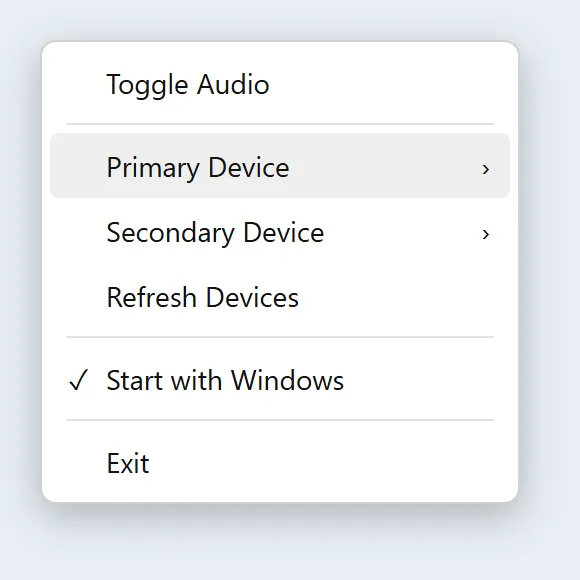
- The right-click menu picks the primary and secondary devices, rescans devices, and turns "Start with Windows" on or off.
- Notices devices being plugged in, removed or changed, and rebuilds the menus to match.
- Remembers the two devices between launches. On a first run, or if a saved device has gone, it guesses from the device names (something with "Speaker", something with "Head") so it works out of the box.
Under the hood
- C# on .NET with Windows Forms, published as a single framework-dependent executable for 64-bit Windows. NAudio's WASAPI bindings enumerate devices and receive change notifications.
- Windows has no public API for changing the default output device, so the switch goes through the undocumented
IPolicyConfigCOM interface. It sets the device as the default for all three roles (console, multimedia and communications), so apps that follow the communications device switch too. - Device-change callbacks arrive on a background COM thread. They are forwarded to a hidden window as a posted message, which handles them on the UI thread. The same window owns the hotkey registration; if Ctrl+F12 is already taken by another program, a tray balloon says so instead of failing silently.
- It is built to sit in the background cheaply: concurrent GC is off, tiered PGO is off, globalisation is invariant, and a debounced timer forces a collection and trims the working set a few seconds after a burst of device events.
- A named mutex keeps it to a single instance. Settings are a small JSON file in the user's AppData folder, and "Start with Windows" is a value under the per-user Run registry key. Errors are appended to a crash log in the same folder.
- Releases are built by a GitHub Actions workflow that publishes the executable and attaches a zip to a release. The executable is unsigned, so Windows SmartScreen warns on first run.
An independent personal tool.